


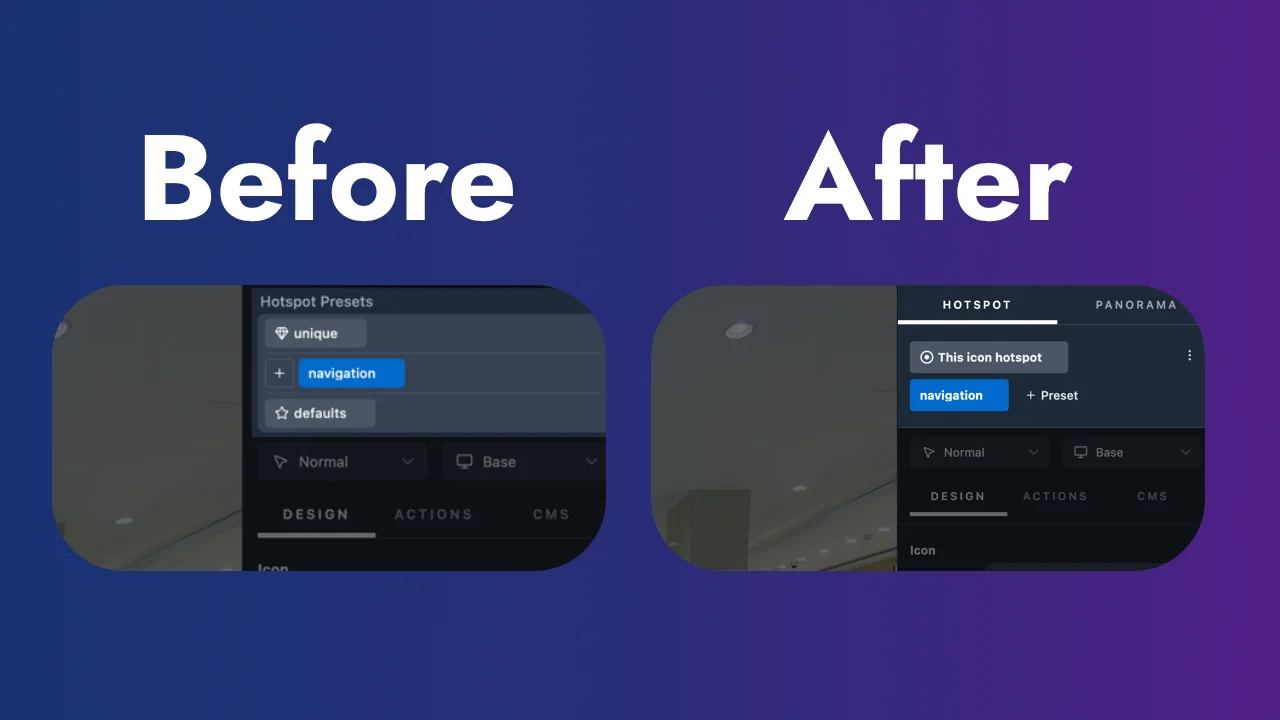
I felt that the Presets were a little overly complicated, even though a lot of thought went into it already. Now defaults is availble through the three dots on the right, keeping the decision easier to select "This icon hotspot" or the custom preset you created yourself.
Simplicity can be complex to achieve 🤓
Oh yes, and as I was doing this, beside having Presets for Hotspots and Skin components, now they're also available for media such as the Panoramas. Making it also easy to manage FOV for interior and exterior panoramas for example.
360Crafter documentation is being written now.
It's been a while working hard on 360Crafter. Today I can proudly announce that the beta version of 360Crafter is available to download!! 😁 I'm extremely excited and curious to hear opinions. Let me know! Download 360Crafter here:
https://360crafter.com/download?utm_source=community
Creating navigation and a left side panel with submenu items dynamically.
Thanks to Sivan VR creator for the content on the Jewelry store.
✅ mac version
✅ linux version
✅ windows version
✅ web version
✅ creating tiles so that exported tours also loads on old phones
✅ unique/custom/default design tokens
✅ tokens also work with actions
✅ upload to server
✅ upload only the changes to the server (not the whole thing all over again, especially when working on large projects)
✅ cms custom fields
✅ design tooltips
✅ connect cms to tooltips
✅ connect cms to skin
✅ CMS List in skin
✅ project variables
✅ craftspace variables
✅ batch rename panoramas
✅ batch select hotspots and bulk edit them
✅ batch select skin components and bulk edit them
✅ box layout: flex
✅ box layout: grid
✅ asset management, replacing a panorama while still being able to revert back to an older version of that panorama
✅ project backup snapshots
✅ selfhosted and cloud analytics external provider
✅ cleaning up interface in clear sections
✅ things more important to me than to users: license system, trial version, signing application to apple, server management
I probably forgot to think of some things. Things might be making sense or not, I know this is a very short technical summary of things. Just wanted to share this with you guys. Letting you know I'm on top of development. Very eager to release the beta this month and start making tutorials.

I am developing a virtual tour project to aid in navigation around a small local theatre. My aim is to enable someone to search for a specific seat number, and the virtual tour would display only the hotspots that lead to the shortest or “best” path starting from the first panorama or a specific location in the virtual tour.
I opted to solve this by first creating a virtual tour of the whole theatre. Then I built a graph of the panoramas (panoramas=nodes, hotspots=Arcs), which will be combined with a search algorithm (BFS) to find the shortest path. Once the path is decided, the first panorama is called (displayed) with all but one of the hotspots that lead to the next panorama according to the search algorithm. The next panorama should also have only one visible hotspot according to the path chosen by the algorithm. I understand that I can hide the hotspots using URL parameters. But how can I automate this to apply seamlessly to each panorama on the path?
Heyyy guys!! 😁
Next Friday 4pm CET (Central European Time) I am organizing the second 360Crafter meetup.
I'm eager to show you what I've been working on and eager to hear your thoughts on it.
Let me know in the comments or a DM if you are planning to come and I will send you the calendar invite with a meetinglink.
Looking forward to it!
There's bunch of big things in 360Crafter to present. At the same time these "little" things make me smile. Easily selecting all panoramas and bulk rename them. Replacing or adding text. As if I'm working in MacOS Finder!
Copy paste a list into the CMS. Copy paste linked pano and hotspot style. Only thing left to do is position the hotspots.
After that: easy update all hotspots. #dreamcometrue
In this video, I share the latest update on 360Crafter and walk through some of the biggest improvements and new features I’ve been working on.
One of the most exciting changes is the introduction of a native desktop application, starting with macOS. Beside using the browser, you can now run 360Crafter also locally on your computer, work without an internet connection, and manage your projects directly on your device. Support for Windows and Linux is also planned.
I demonstrate how the new local workspace works: creating a project, importing panoramas with simple drag-and-drop and navigating between scenes using the new Slide To transition. Performance has also been significantly improved, making panorama loading and switching much faster than before.
You’ll also see updates to the workflow, including setting default views more quickly.
This video is a quick look at the progress so far and where 360Crafter is heading next.